iTask - Habit & To-Do1.1.33
Publisher Description

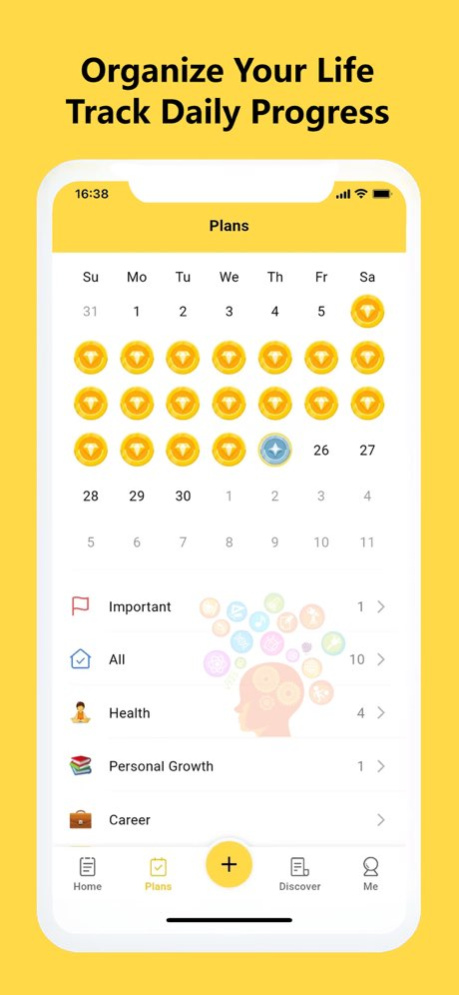


Unlock Your Potential for Free with iTask: To Do List Task Manager and Habit Tracker!
iTask is your go-to app for conquering your daily tasks and building positive habits-all at no cost to you. With a comprehensive suite of features including to-do lists, habit tracking, daily schedule planning, reminders, checklists, and more, iTask has everything you need to streamline your life and maximize your productivity.
Reasons for choosing this Todo-list and Habit Tracker APP:
- Stay Organized: Seamlessly plan your day with our intuitive calendar view. From scheduling important tasks to setting reminders for key events, iTask keeps you on top of your game.
“iTask - Schedule Planner & To.Do.list Reminders ” provides a to-do list calendar perspective. Make it easier for users to have a general view of daily schedule planners, weekly/monthly tasks planners and future day planners.
- Effortless Task Management: Create multiple to-do lists effortlessly and prioritize your tasks with customizable categories and checklists.
With the “iTask - Schedule Planner & To Do list Reminder App Free ”, you can easily set to-do list categories, task list priorities, and todos’ stars to manage the todo lists and day planners efficiently.
- Build Lasting Habits: Harness the power of repetition to cultivate healthy routines. "iTask:Habit Tracker" helps you integrate positive habits into your daily life, whether it's sticking to a study schedule or maintaining a tidy living space.
We believe establishing good daily habits and healthy routines are necessary to thrive.
- Tailored for You: Whether you're a student, a professional, or a busy parent, iTask adapts to your lifestyle. Use it to manage work projects, plan your studies, track your fitness goals, and organize your shopping lists-all in one convenient app, all for free.
- Track Your Progress: Monitor your productivity and celebrate your achievements with our insightful completion status tracker. With "iTask:Daily Routine Planner & To-do list", you can see how far you've come and stay motivated to keep pushing forward.
-Easy to use and beautiful todo list themes:
The interface of the todolist application is simple and efficient. You can create multiple to do tasks lists with only 2 steps.
Set up daily to do list to let you quickly check today's to.do.list and schedule planner.
"iTask:Daily Routine Planner" provide a variety of theme colors to choose. Make you feel more comfortable when managing todo-list and doing task trackers. Manage all your daily planners free.
- Free Work & Life Daily Planner App
"iTask:to-do list & planner" is a free daily planner app. You can use it to record various schedule planners , including life planners, work planners, study planners, productivity planner, fitness day planners, wishlists etc.
You can also use "iTask:Daily Routine Planner" as a personal day planner free app to record birthdays and anniversaries. Don’t forget to set a daily schedule planner with reminders. It gives you on-time task reminders
Use "iTask:To-Do List - Schedule Planner" to plan or track anything,iTaskis flexible and loaded with features, so no matter what you require from your task planner or to-do list, iTask can help you organize your work and life.
. Daily reminders
. Project Calendars
. Habit tracker
. Daily planner
. Weekly planner
. Holiday planner
. Grocery list
. Project management
. Chore tracker
. Task manager
. Study planner
. Bill planner
. Shopping list
. Task management
. Business planning
. To-do list(todolist)
. And more
Unlock Your Full Potential with iTask -where productivity meets possibility. Download now and start living your best life today-for free!
Privacy Policy: https://task.quhou123.com/Info/privacyPolicy
EULA: https://www.apple.com/legal/internet-services/itunes/dev/stdeula/
Version History • Added calendar sync so your plans stay aligned with your calendar
• Improved AI features for a smoother and more reliable experience 1.1.33 Sep 22 • Fixed several bugs for better stability
• Improved interface and overall user experience 1.1.30 Sep 11 • Added support for AI agent features.
• Fixed several bugs and improved stability. 1.1.24 Aug 12 - Supports drag-and-drop sorting
- Supports widgets 1.1.11 11/29/2025 bug fixed. 1.0.5 07/19/2024 1.0 07/15/2024
About iTask - Habit & To-Do
The company that develops iTask - Habit & To-Do is 奎 郑. The latest version released by its developer is 1.1.33.
To install iTask - Habit & To-Do on your iOS device, just click the green Continue To App button above to start the installation process. The app is listed on our website since 2026-10-14 and was downloaded 0 times. We have already checked if the download link is safe, however for your own protection we recommend that you scan the downloaded app with your antivirus. Your antivirus may detect the iTask - Habit & To-Do as malware if the download link is broken.
How to install iTask - Habit & To-Do on your iOS device:
- Click on the Continue To App button on our website. This will redirect you to the App Store.
- Once the iTask - Habit & To-Do is shown in the iTunes listing of your iOS device, you can start its download and installation. Tap on the GET button to the right of the app to start downloading it.
- If you are not logged-in the iOS appstore app, you'll be prompted for your your Apple ID and/or password.
- After iTask - Habit & To-Do is downloaded, you'll see an INSTALL button to the right. Tap on it to start the actual installation of the iOS app.
- Once installation is finished you can tap on the OPEN button to start it. Its icon will also be added to your device home screen.
Program Details
System requirements
Download information
Pricing
Version History
version 1.1.33
posted on 2026-10-14
Version History • Added calendar sync so your plans stay aligned with your calendar
• Improved AI features for a smoother and more reliable experience 1.1.33 Sep 22 • Fixed several bugs for better stability
• Improved interface and overall user experience 1.1.30 Sep 11 • Added support for AI agent features.
• Fixed several bugs and improved stability. 1.1.24 Aug 12 - Supports drag-and-drop sorting
- Supports widgets 1.1.11 11/29/2025 bug fixed. 1.0.5 07/19/2024 1.0 07/15/2024
version 1.1.33
posted on 2026-09-27
Version History • Added calendar sync so your plans stay aligned with your calendar
• Improved AI features for a smoother and more reliable experience 1.1.33 5d ago • Fixed several bugs for better stability
• Improved interface and overall user experience 1.1.30 Sep 11 • Added support for AI agent features.
• Fixed several bugs and improved stability. 1.1.24 Aug 12 - Supports drag-and-drop sorting
- Supports widgets 1.1.11 11/29/2025 bug fixed. 1.0.5 07/19/2024 1.0 07/15/2024
version 1.1.30
posted on 2026-09-20
Version History • Fixed several bugs for better stability
• Improved interface and overall user experience 1.1.30 Sep 11 • Added support for AI agent features.
• Fixed several bugs and improved stability. 1.1.24 Aug 12 - Supports drag-and-drop sorting
- Supports widgets 1.1.11 11/29/2025 bug fixed. 1.0.5 07/19/2024 1.0 07/15/2024
version 1.1.30
posted on 2026-09-13
Version History • Fixed several bugs for better stability
• Improved interface and overall user experience 1.1.30 2d ago • Added support for AI agent features.
• Fixed several bugs and improved stability. 1.1.24 Aug 12 - Supports drag-and-drop sorting
- Supports widgets 1.1.11 11/29/2025 bug fixed. 1.0.5 07/19/2024 1.0 07/15/2024
version 1.1.24
posted on 2026-09-06
Version History • Added support for AI agent features.
• Fixed several bugs and improved stability. 1.1.24 Aug 12 - Supports drag-and-drop sorting
- Supports widgets 1.1.11 11/29/2025 bug fixed. 1.0.5 07/19/2024 1.0 07/15/2024
version 1.1.11
posted on 2026-08-11
Version History - Supports drag-and-drop sorting
- Supports widgets 1.1.11 11/29/2025 bug fixed. 1.0.5 07/19/2024 1.0 07/15/2024
version 1.1.11
posted on 2025-11-29
- Supports drag-and-drop sorting
- Supports widgets
